


Transferring your pension to an InvestEngine SIPP can be straightforward. In this guide, we explain how pension transfers work, what to check before you start, and what to expect along the way.
If you are considering moving an existing defined contribution pension, here is everything you need to know.
Why transfer your pension?
Many investors choose to transfer for:
- Lower costs
- More investment choice
- Easier online management
- Bringing pensions together in one place
With an InvestEngine SIPP, you can invest in a range of hand-picked ETFs with no platform or dealing fees on DIY portfolios. ETF costs apply.
As always, make sure a transfer is right for you. You should check for exit fees, guarantees or valuable benefits before moving any pension.
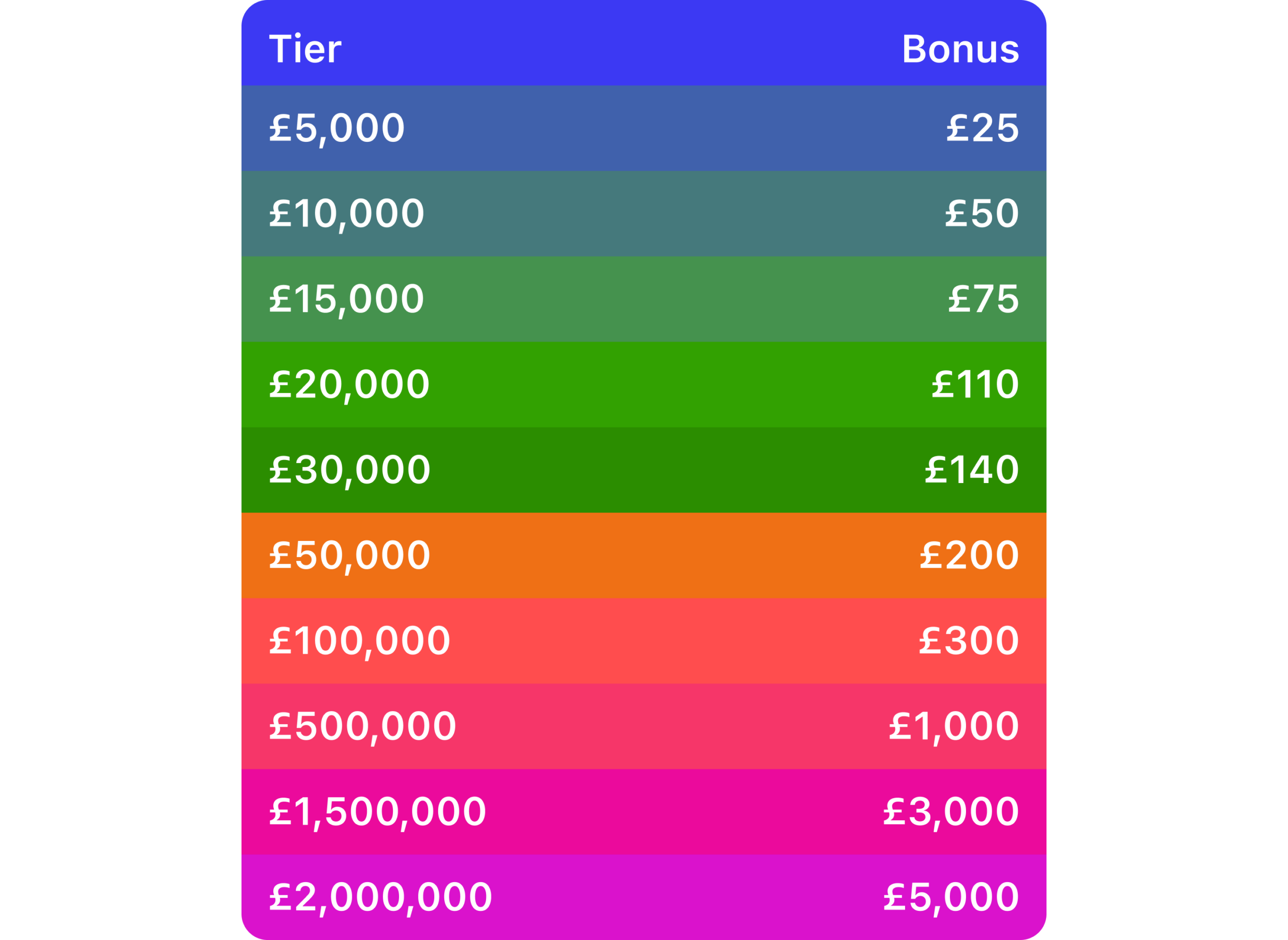
Get up to £5,000 when you transfer
It’s easy to transfer your existing ISA to InvestEngine for fee-free investing. You could also get up to £5,000 when you do switch. ETF costs apply. The bonus is tiered and requires your investment to remain invested for at least 12 months.
Find out moreCapital at risk. Ts&Cs apply
Before transferring, please review any fees, exit costs and whether your existing investments would need to be sold and reinvested into ETFs.
Step 1: Check your pension is eligible
We accept transfers from many of the UK’s largest defined contribution providers, including:
- Scottish Widows
- Hargreaves Lansdown
- NEST
- Aviva
If your provider is not currently listed, you can submit their details and we will investigate whether they can be added.
We cannot accept:
- Transfers from pensions already in drawdown
- Defined benefit pensions
- Pensions with a pension sharing or earmarking order
- Pensions with a protected retirement age
- Workplace pensions still receiving employer contributions
- Partial transfers
If your employer is still paying into the pension, you would usually need to stop contributions or wait until you leave employment before transferring.
If you are unsure about the type of pension you hold, contact your existing provider first.
Step 2: Understand cash vs in-specie transfers
There are two ways to transfer a pension.
Cash transfer
Your current provider sells your investments and sends the cash to your new SIPP.
- Typically takes around 2 to 3 weeks
- You are out of the market during the transfer
- Suitable if your current holdings are not available on InvestEngine
In-specie transfer
Your investments are moved across without being sold.
- Typically takes around 4 to 6 weeks
- Your investments stay in the market
- Only possible for ETFs available on InvestEngine
- Some providers do not support in-specie transfers
If both options are available, you can choose during the transfer process. If only cash is available, this will be clearly shown in the form.
Step 3: Set up your InvestEngine SIPP
To open a SIPP you must:
- Be a UK tax resident
- Provide your National Insurance number
Once your account is set up:
- Log in to your dashboard
- Select Create portfolio or transfer
- Choose Transfer a pension
You will then select your provider and complete the transfer form.
Step 4: Complete the transfer form carefully
Getting the details right helps avoid delays.
Important checks:
- Make sure your full legal name matches exactly with your existing provider
- Ensure your date of birth and address match
- Enter your pension reference in the correct format
Where possible, guidance will appear in the form to show the format required.
You will also choose which DIY portfolio the transfer should be paid into.
Tracking your transfer
Once submitted:
- You will receive a confirmation email
- A transfer in progress indicator will appear on your destination portfolio
- If you start multiple transfers, you can view them in the transfer centre
You will receive email confirmation when:
- Cash is received
- ETFs settle in your account
From the point your provider releases the cash, it usually takes 3 to 5 working days to appear in your InvestEngine portfolio.
How long does a pension transfer take?
Timeframes depend on your current provider and the type of transfer.
- Cash transfers: usually 2 to 3 weeks
- In-specie transfers: usually 4 to 6 weeks
Some providers require additional forms or questionnaires. If you are over 50, they may also send information about drawdown options, which can extend the timeline.
Delays are often caused by mismatched personal details, so double check everything before submitting.
What about tax relief or dividends due?
If tax relief or dividend payments are still due in your old pension:
- The transfer can still go ahead
- Any residual payments will be forwarded to us once received
- These will be applied to your portfolio when they arrive
It can help to contact your previous provider to ensure any remaining balance is sent across.
Before you transfer
Make sure you consider:
- Exit fees or penalties
- Guaranteed benefits you may lose
- Whether the investment options suit your goals
- Your risk tolerance
A SIPP is designed for long-term retirement investing. Pension money is usually accessible from age 55, rising to 57 from 2028.
If you are unsure whether transferring is right for you, you may wish to speak to a financial adviser.
Bringing your pension together
Transferring can make it easier to:
- See all your investments in one place
- Manage your asset allocation
- Reduce complexity
With InvestEngine, you can combine your SIPP with an ISA or General Investment Account and manage everything in one dashboard.
Ready to start?
If you would like to begin your pension transfer:
- Log in to your account
- Select Create portfolio or transfer
- Choose Transfer a pension
If you have questions, our support team is available at support@investengine.com.
Important information
Capital at risk. The value of your portfolio with InvestEngine can go down as well as up and you may get back less than you invest. ETF costs apply.
This communication is for general information only and should not be considered financial advice. If in doubt, you may wish to consult a professional adviser.
Tax treatment depends on personal circumstances and is subject to change.